
Windows Phone 7 XNA Samples

I just discovered some new XNA 4.0 samples for the Windows Phone 7.
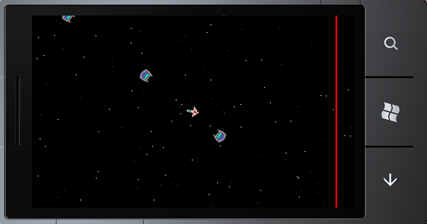
Phone 7 Screenshot

The sample is pretty easy to understand and seems to be simple to reuse on your own project. The screenshot above is from the TouchThumbsticks sample.

See all the samples here.

[more]

Touch Thumbsticks
This sample demonstrates a technique for using the touch panel to provide thumbstick-style controls for a game on Windows Phone.
Waypoints
This sample demonstrates basic navigation using waypoints. Waypoints has been updated to support touch controls on Windows Phone.
Sprite Sheet
This updated sample for Windows and Windows Phone shows how to implement sprite sheets, combining many separate sprite images into a single larger texture that will be more efficient for the graphics card.
Stock Effects
This Stock effects sample for Windows provides source code for the five effects (BasicEffect, SkinnedEffect, EnvironmentMapEffect, DualTextureEffect, and AlphaTestEffect), and the default shader used by SpriteBatch (SpriteEffect), built into the XNA Framework. There also is a command-line utility (CompileEffect) that uses the Content Pipeline to compile a .fx source file into a binary blob that can be passed directly to the XNA FrameworkEffect class constructor.
Accelerometer
This sample for Windows Phone demonstrates using the Accelerometer sensor in XNA Game Studio 4.o as well as supplies an Accelerometer wrapper that can be used to easily implement Accelerometer functionality in your games 
Bounce
This sample for Windows Phone demonstrates Sphere to Sphere and Sphere to Plane physics through use of the Accelrometer
Fuzzy Logic
This updated sample for Windows and Windows Phone shows how an AI can use fuzzy logic to make decisions. It also demonstrates a method for organizing different AI behaviors, similar to a state machine.

– Enjoy!

Source for this article:
http://creators.xna.com/en-US/news/educationresources_July28
http://creators.xna.com/en-US/news/educationresources_Aug4
Enable/Disable TreeViewDragDropTarget in Silverlight 4

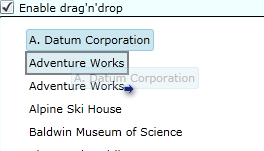
I recently found out, to my surprise, that the TreeViewDragDropTarget (found in the Silverlight 4 Toolkit), doesn’t have an “EnableDragDrop=true/false” property. 
So how do you enable / disable the drag’n’drop mechanism?

image

[more]

I’m recently worked on a project where I needed this property. At least I needed to be able to toggle drag’n’drop on and off depending on some conditions in the application.
So here is how I did it.

You can download a sample project here to see it in action.

First you hook up to the ItemDragStarting event on the TreeViewDragDropTarget control.

<toolkit:TreeViewDragDropTarget x:Name="treeViewDragDropTarget" AllowDrop="true"
              ItemDragStarting="TreeViewDragDropTarget_ItemDragStarting" >

Then, secondly, you just set the event args to Cancel = true and Handled = true like this.

 private void TreeViewDragDropTarget_ItemDragStarting(object sender, ItemDragEventArgs e)
        {
            //Some condition
            if (!DragDropToggleCheckBox.IsChecked.Value)
            {
                e.Cancel = true;
                e.Handled = true;
            }
        }

That’s all! Eventhough it’s this easy to do, I would still like to have a property on the TreeViewDragDropTarget control to do this for me.

– Enjoy!

Windows Phone 7 Tools Beta and XNA 4.0 Beta Available for Download

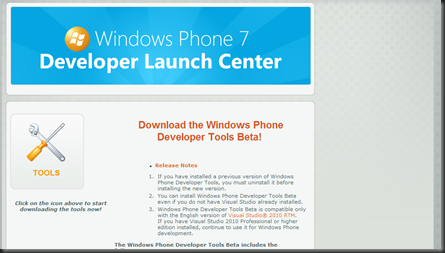
The beta tools are now available and can be downloaded from here.
http://creators.xna.com/en-US/launchcenter

image

Orientation and Rotation

One of the new features in the XNA 4.0 for Windows Phone 7, is the ability to rotate a game without you having to code it up your self. Looks pretty cool, haven’t tried it out yet though.
http://blogs.msdn.com/b/shawnhar/archive/2010/07/12/orientation-and-rotation-on-windows-phone.aspx

Multitouch Behavior

Demo of multitouch on the Windows Phone 7 Beta emulator.
http://blog.galasoft.ch/archive/2010/07/12/multitouch-behavior-update-for-windows-phone-7-tools-beta.aspx

– Enjoy!