
Visual Studio 2010 Productivity Power Tool Extensions – get them now!

Microsoft have just released the Visual Studio 2010 Productivity Power Tool Extensions which extent VS2010 with some features that make the use of it even better. If you haven’t already downloaded them – do it now!

[more]

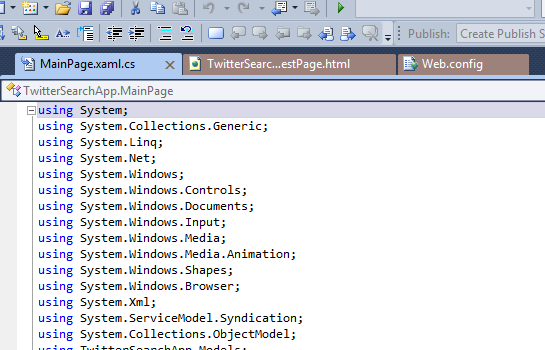
One of the features is the coloring/categorizing of the “Document tab”, you know the tab for each document you have open inside VS2010.
image

It makes documents from the same project the same color and put them together, to make it easier for you to quickly see what belongs where. It works pretty good actually. The funny thing about thie feature is that I actually got the idea for something similar some months ago. I tried to create a plugin for VS2010 (beta as it were at the time), but stopped pretty quickly as it were pretty hard, as I’m not use to work in that field.
Now I see that Microsoft have done it them self, which is very good, then I don’t have to spend time on it, I just need to use it :)

These extentions is much more than just coloring the document tabs. Here are links to some posts about it.

http://weblogs.asp.net/scottgu/archive/2010/06/09/visual-studio-2010-productivity-power-tool-extensions.aspx
http://blogs.msdn.com/b/lisa/archive/2010/06/08/visual-studio-2010-pro-power-tools-released-today.aspx

You can go and get the plugin from there – it’s really tiny!
http://visualstudiogallery.msdn.microsoft.com/en-us/d0d33361-18e2-46c0-8ff2-4adea1e34fef

– Enjoy!

A possible solution to the error “XAML Namespace http://schemas.microsoft.com/expression/blend/2008 is not resolved.”

After I googled for this error for some time, without any luck, I decided t o write a quick blog post about it, just to help others which might have the error due to the same reasons as me.

Today I got this error “XAML Namespace http://schemas.microsoft.com/expression/blend/2008 is not resolved.” in a Silverlight 4 project. I happened right after I added some VisualStates in Blend 4. I could remove the VisualState XAML and everything would then build again fine. As meantioned I googled the error but couldn’t find a solution.

[more]

It seems like Blend 4 got a little confused and forgot to add an attribute in XAML for me, which made this error happen. The way I found out were that I saw I had some of the xmlns:d=”…” and xmlns:mc=”…” in my XAML, eventhough I couldn’t remeber I had ever been to Blend with this project. As I knew these are used by Blend to do different stuff, I tried to remove all of thie “Blend” XAML from the top of my UserControl. After that I added the VisualStates again and everything worked. I checked the XAML and it seems like Blend “forgot” to add this little attribute to my UserControl the first time: mc:Ignorable="d"

I guess it got confused as I had some of the “Blend” XAML stuff in my code already.
Just wanted to put this on my blog to help others which might end up with this error :)

I forgive you this time Blend, but don’t let it happen again.

– Enjoy!

Little Longhorn – Part 9.5 – Small break

Due to some busy weeks at work the next few weeks I need to stop my “2 week” blog posts, which normally gives a little update about how the game are doing. As I know I will get very busy in the coming weeks at my job, I know I wouldn’t have time to code on Little Longhorn, which means I wouldn’t have anything to write about :)

Stay tuned as we can hopefully show some of the graphics for the game when we get back, as the graphic guys are doing a great job currently. So let’s see what Mikkel Laumann and Thomas Jørgensen comes up with.