Bill Reiss over at Silverlight Games 101 did a great video about game development in Silverlight. He provides source and slide show too. If you haven’t already seen it, go do it.
See Bill’s post here: Video – Overview of Silverlight Game Development


Building enterprise solutions by day and games by night
Bill Reiss over at Silverlight Games 101 did a great video about game development in Silverlight. He provides source and slide show too. If you haven’t already seen it, go do it.
See Bill’s post here: Video – Overview of Silverlight Game Development
I’m playing around with the Farseer Physics Engine these days and needed to draw the “collision boundaries”. These are called Geom (Geometries) in Farseer language and these are made up by Vertices.
Cameron Albert have already made code to do this and I have already used it in my Farseer Physics Simple Samples so that were an easy one.
Then I ran into some problems/confusion with the “position” of elements. Basically it was due to that Farseer’s position is at the center of an element, whereas Silverlight’s version of position is at the top left corner. This is actually not that confusing as it is written here, but it can quickly become pretty confusing, at least I think :)
[more]
So, I extended Cameron’s code from above with the following:
 //Draw center of bodies
foreach (Body body in physicsSimulator.BodyList)
{
 Ellipse centerEllipse = new Ellipse();
 centerEllipse.Width = 3;
 centerEllipse.Height = 3;
 centerEllipse.Fill = new SolidColorBrush(Colors.Red);

 Canvas.SetLeft(centerEllipse, body.Position.X - centerEllipse.Width / 2);
 Canvas.SetTop(centerEllipse, body.Position.Y - centerEllipse.Height / 2);

 debugCanvas.Children.Add(centerEllipse);
}
It’s really very simple, but it helps you see where your Farseer center point/position is. Here is a screenshot showing it in action. The purple lines are vertices and the red dots are the center points.
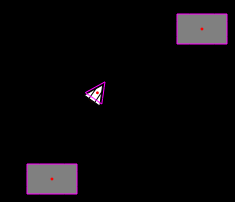
Here is the hole method. The layout of it is really bad here at my blog, but it should be ok to copy/paste from here and into VS :)
public static void DrawVertices(Canvas debugCanvas, PhysicsSimulator physicsSimulator)
        {
            debugCanvas.Children.Clear();

            //Draw vertices
            int verticeCount = 0;
            for (int i = 0; i < physicsSimulator.GeomList.Count; i++)
            {
                verticeCount = physicsSimulator.GeomList[i].LocalVertices.Count;
                for (int j = 0; j < verticeCount; j++)
                {
                    Line line = new Line();
                    line.Fill = new SolidColorBrush(Colors.Transparent);
                    line.Stroke = new SolidColorBrush(Colors.Magenta);
                    line.StrokeThickness = 1;
                    if (j < verticeCount - 1)
                    {
                        line.X1 = physicsSimulator.GeomList[i].WorldVertices[j].X;
                        line.Y1 = physicsSimulator.GeomList[i].WorldVertices[j].Y;
                        line.X2 = physicsSimulator.GeomList[i].WorldVertices[j + 1].X;
                        line.Y2 = physicsSimulator.GeomList[i].WorldVertices[j + 1].Y;
                    }
                    else
                    {
                        line.X1 = physicsSimulator.GeomList[i].WorldVertices[j].X;
                        line.Y1 = physicsSimulator.GeomList[i].WorldVertices[j].Y;
                        line.X2 = physicsSimulator.GeomList[i].WorldVertices[0].X;
                        line.Y2 = physicsSimulator.GeomList[i].WorldVertices[0].Y;
                    }
                    debugCanvas.Children.Add(line);
                }
            }

            //Draw center of bodies
            foreach (Body body in physicsSimulator.BodyList)
            {
                Ellipse centerEllipse = new Ellipse();
                centerEllipse.Width = 3;
                centerEllipse.Height = 3;
                centerEllipse.Fill = new SolidColorBrush(Colors.Red);

                Canvas.SetLeft(centerEllipse, body.Position.X - centerEllipse.Width / 2);
                Canvas.SetTop(centerEllipse, body.Position.Y - centerEllipse.Height / 2);

                debugCanvas.Children.Add(centerEllipse);
            }
        }
I just saw a little tweet on Twitter about this very good blog post. Here’s a quote from it, see the link at the end if you want to read the whole post, it’s really good reading.
“[Veteran indie game creator Edmund McMillen, known for his work on 2005 IGF Grand Prize winner Gish, Time Fcuk, and Super Meat Boy for WiiWare, shares his opinions and manifesto on making indie games, with 24 clear do-s and don’t-s to make your art thrive.]
One of the most common questions I’m asked in interviews is, “Do you have any advice for independent game developers who are new to the scene, or tips for developers in general?” Well, I actually answered it this time: I came up with this list of indie do-s and don’t-s.
Now, I’m going to make clear that I’m not perfect and I’m sure as the years go by this list will change. But from where I stand right now, having made independent art/games for a living for the past 10 years, the advice below is crucial to all indie game designers, and all artists for that matter.
Also note that when I refer to a “designer” or “artist,” I include programmers. All aspects of art have a fine balance of the technical and creative; just because programming is viewed as a technical field does not mean it is void of creativity. The creative is visible in the work as a whole rather than in the specifics. Light and shadow are vital technical aspects of illustration, but without creativity the piece is nothing more then a photocopy of the subject, void of any personal touch or presence.
This is a list for the creative designer who strives to be independent. This isn’t advice on how to monetize your Flash game or survive financially by copying existing trends and juicing the public for their cash. This is a list for artists who are driven by the desire for creative freedom and/or to “just make some cool shit people will love.””
Read more here: Opinion: Indie Game Design Do-s and Don’t-s: A Manifesto