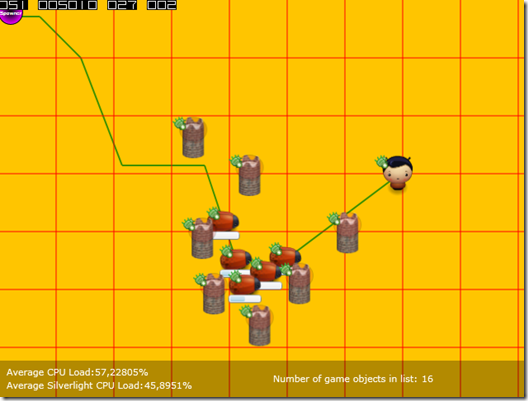
As you might already know, I’m currently trying to get some of the basic stuff implemented for an “Tower defense”-genre (TD) game into Little Longhorn. I’m making progress, but have now run into a little problem. In this blog post I will try to explain which features that are coursing the trouble and hopefully, after I got some input/help from some of you guys out there, I can also post the solution for others to learn from and use.
Let me also make it clear that I’m not asking for complete code samples provided by one of you guys, I’m asking for a good dialog about this problem and different possible solutions for it. I will figure out the code myself, it’s the “thoughts behind” or what you want to call it I’m after here, some inspiration you could say. Hoping for some good input :)
WARNING: This post includes my own hand-made drawings! :)
Course of the problem(s)
Well, the main reason to this/these problems are that Little Longhorn is a little different than a normal TD. In normal TD games I see a lot of use of the mouse to interact with the game, Little Longhorn doesn’t use a mouse for anything. You are now thinking, “But how are you going to place towers, upgrade them etc?”. Instead of a mouse, you have an character you play in the game. This little guy is controlled by the arrow keys at the moment. This little player character will walk around, avoiding being hit by enemies, while he collect gold and build new towers, controlled by you of course. So you actually have to “walk” to where you want your tower and then build it there. It might sound weird to you, if you are use to play the standard online TD games, but believe me, this works and adds a hole different aspect to the game.
The above is what course the troubles I’m having here, but let me explain what I’m trying to archive and then you might see the problem.
The actual problem(s)
The following is what I need to have implemented in the game.
“Normal” collision
I need basic collision in the game. This is actually almost in place in the code and is actually working ok. My implementation is pretty similar to what Joel Neubeck describes in this article, I just have it all divided up in classes etc, but the basics are the same. This collision mechanism should be used to detect is the player is colliding with an enemy.
(Yes, I made this drawing myself :) Keep in mind that all graphics you see on screenshots, drawings etc, are all just “temp” graphics, so don’t get confused if an enemy looks like an alien in one image and a beetle in another one)
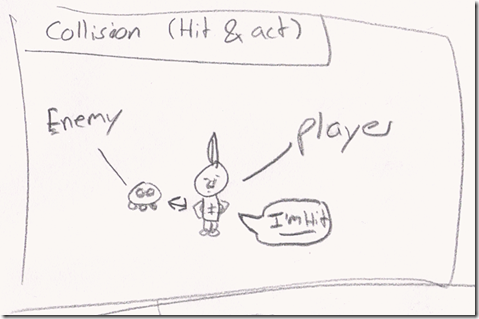
This is the most common collision (and maybe the mechanism that all the rest of the features can use? I’ll get back to that later). GameObject A intersect with GameObject B, and a “Collide()” method is called on both GameObject’s which they can act upon.
“Block” collision
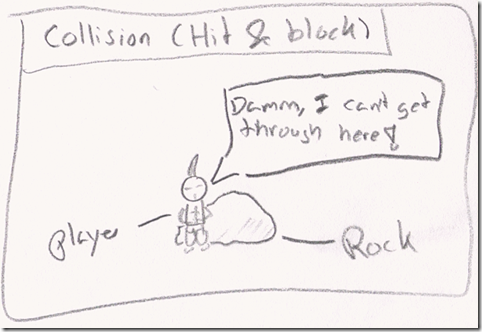
At some point in the game, I need to be able to place objects that that player can’t go through, ex. a rock. This is essential the same collision as the “normal” one, I just can’t figure out how to implement it? All my “GameObjects” moves around using the normal “Vector/Velocity” approach (if you don’t know this approach Joel Neubeck describes this too in this article series). I have tried setting the Velocity equals to an “Zero” when the player hits a “rock” (actually i tried it on an enemy just for testing purpose), but it didn’t have the right effect :)
“Detection” of enemies
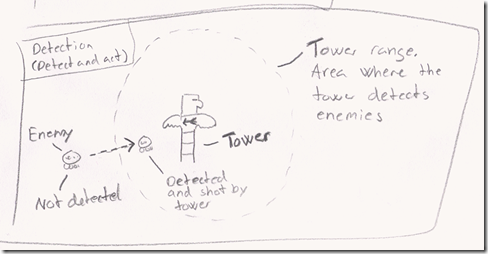
One of the basic features in a TD game, is the towers ability to detect enemies in a range and shoot at them. I have this implemented in the game right now actually, but it’s done by using the “normal” collision detection described above. This works “ok”, but is it the “right” way to do it? What I have done now is that I have given the towers a big “CollisionSphere”, which is actually a collision object, but act as a “range of sight” for the tower. Is this the right way to do it? I mean, at the moment, when the enemy is inside the towers “range” a collision is happening in every tick of the game. Is that wise or could this be done in another and better way?
“Selection” of elements
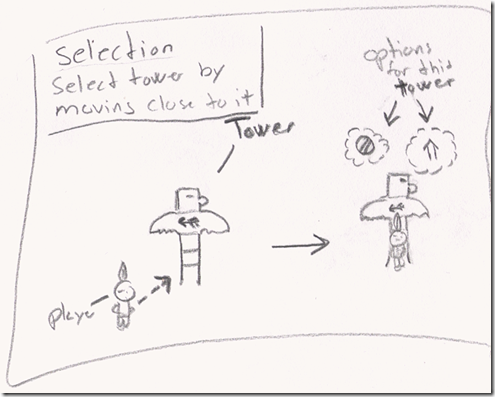
As stated earlier you don’t have a mouse in this game, all interaction is done through your player character. In the game you can only build towers on special elements that I (the level editor) put in there. This mean that when you want to build a tower to need to move your player character close to one of these “building” spots, hit “space” and a build-menu will show up. You choose the type of tower you want to build, and hit “space” again and your tower is build on that spot(this isn’t actually implemented in the game yet). The same approach is used when you want to delete or upgrade a tower. Move close to it and hit “space” and the options for this tower will appear.
The problem for me, at this point in time, is this “selection” mechanism. Basically, in my head that is, this is also a kind of “collision”, but at the same time it’s conceptually not, because nothing is actually colliding logically.
Let’s sum it up
All the above can somehow to boiled down to being “collision” related. I just can’t figure out how I should implement these features. I have tried out different things but nothing seems to be “good”. In my mind all of the above should be able to be archived by using the same “intersection” algorithms that I use already and then adjust the behavior of the colliding objects properly, it’s just not that simple. I’m pretty empty on good idea for how to implement this, so all input are welcome. Please let me know if you need more information about something and I will gladly give it to you.
You can get the current source code of the game here. The game is not intended to be an open source game, but I have decided to share the code in this early stage, to give you guys the best possibility to help me out here. And then you can also see how I have build the game so far. Keep in mind that the source is very work-in-progress, which is why there are a lot stuff in there that isn’t used for anything.
Hope for great dialog and some good feedback/ideas.
Thanks in advance :)