Enable/Disable TreeViewDragDropTarget in Silverlight 4

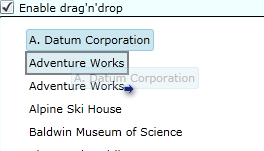
I recently found out, to my surprise, that the TreeViewDragDropTarget (found in the Silverlight 4 Toolkit), doesn’t have an “EnableDragDrop=true/false” property. 
So how do you enable / disable the drag’n’drop mechanism?
image

[more]

I’m recently worked on a project where I needed this property. At least I needed to be able to toggle drag’n’drop on and off depending on some conditions in the application.
So here is how I did it.

You can download a sample project here to see it in action.

First you hook up to the ItemDragStarting event on the TreeViewDragDropTarget control.

<toolkit:TreeViewDragDropTarget x:Name="treeViewDragDropTarget" AllowDrop="true"
              ItemDragStarting="TreeViewDragDropTarget_ItemDragStarting" >

Then, secondly, you just set the event args to Cancel = true and Handled = true like this.

 private void TreeViewDragDropTarget_ItemDragStarting(object sender, ItemDragEventArgs e)
        {
            //Some condition
            if (!DragDropToggleCheckBox.IsChecked.Value)
            {
                e.Cancel = true;
                e.Handled = true;
            }
        }

That’s all! Eventhough it’s this easy to do, I would still like to have a property on the TreeViewDragDropTarget control to do this for me.

– Enjoy!
Windows Phone 7 Tools Beta and XNA 4.0 Beta Available for Download

The beta tools are now available and can be downloaded from here.
http://creators.xna.com/en-US/launchcenter

image

Orientation and Rotation

One of the new features in the XNA 4.0 for Windows Phone 7, is the ability to rotate a game without you having to code it up your self. Looks pretty cool, haven’t tried it out yet though.
http://blogs.msdn.com/b/shawnhar/archive/2010/07/12/orientation-and-rotation-on-windows-phone.aspx

Multitouch Behavior

Demo of multitouch on the Windows Phone 7 Beta emulator.
http://blog.galasoft.ch/archive/2010/07/12/multitouch-behavior-update-for-windows-phone-7-tools-beta.aspx

– Enjoy!

Visual Studio 2010 Productivity Power Tool Extensions – get them now!

Microsoft have just released the Visual Studio 2010 Productivity Power Tool Extensions which extent VS2010 with some features that make the use of it even better. If you haven’t already downloaded them – do it now!

[more]

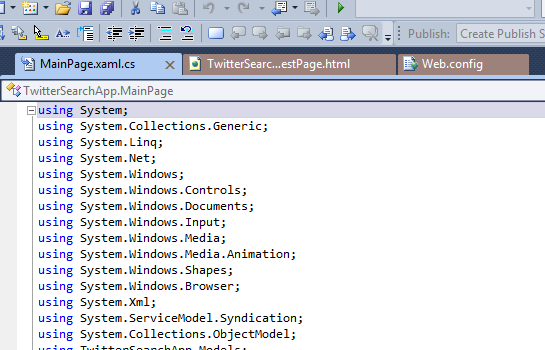
One of the features is the coloring/categorizing of the “Document tab”, you know the tab for each document you have open inside VS2010.

image

It makes documents from the same project the same color and put them together, to make it easier for you to quickly see what belongs where. It works pretty good actually. The funny thing about thie feature is that I actually got the idea for something similar some months ago. I tried to create a plugin for VS2010 (beta as it were at the time), but stopped pretty quickly as it were pretty hard, as I’m not use to work in that field.
Now I see that Microsoft have done it them self, which is very good, then I don’t have to spend time on it, I just need to use it :)

These extentions is much more than just coloring the document tabs. Here are links to some posts about it.

http://weblogs.asp.net/scottgu/archive/2010/06/09/visual-studio-2010-productivity-power-tool-extensions.aspx
http://blogs.msdn.com/b/lisa/archive/2010/06/08/visual-studio-2010-pro-power-tools-released-today.aspx

You can go and get the plugin from there – it’s really tiny!
http://visualstudiogallery.msdn.microsoft.com/en-us/d0d33361-18e2-46c0-8ff2-4adea1e34fef

– Enjoy!